Getting Started with TypeScript
A practical Guide to TypeScript basics

Hey! I love learning and writing about the behind-the-scenes of how and why something works the way it does.
I (mostly, but not limited to) write about theoretical concepts and inner workings of technologies I'm exploring.
JavaScript is a dynamically typed language, which means a variable can hold values of different types during the execution of a program.
For example,
let userName = "iron man"
The following is allowed even though I don't know why you would ever do it:
userName = 6777777;
JavaScript allows this because a variable's type is not fixed. While this flexibility is one of JavaScript’s features, it can also lead to unexpected errors at runtime. As applications grow larger, these errors become harder to catch and can turn into a real headache for developers.
TypeScript helps solve this problem by adding a static type system to JavaScript. It allows you to describe the types of variables, function parameters, return values, and objects. This helps you catch mistakes earlier, write more maintainable code, and work more confidently on larger projects.
Simply,
TypeScript is a superset of Javascript.
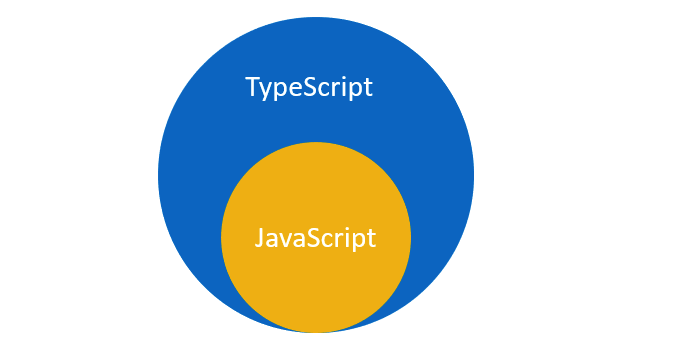
TypeScript code is eventually transpiled into JavaScript, which will then be executed by browsers, Node.js, or other JavaScript environments.
Prerequisites
Javascript fundamentals
Dev tools (code editor, Node.js, npm, terminal)
What is TypeScript?
TypeScript is an open-source language built on top of JavaScript. It was developed by Microsoft and adds a powerful type system to JavaScript.
One of the biggest advantages of TypeScript is that it can detect many mistakes before your code runs, which helps prevent bugs from reaching production.
As we saw earlier, JavaScript is dynamically typed, which means a variable can hold values of different types:
let age = 25;

age = "twenty-five";
This is valid JavaScript.
In TypeScript, however, the type of a variable can be checked:
let age: number = 25;

age = "twenty-five";
// Error: Type 'string' is not assignable to type 'number'.
Getting Started
Installing TypeScript
- Global Installation:
npm install -g typescript
- Local Installation:
npm install typescript --save-dev
You can write TypeScript in a .ts file.
app.js becomes app.ts
If you're working with React and JSX, you can use:
app.tsx.
The .tsx extension allows you to write both TypeScript and JSX.
Basic Types
Primitive Types
String - represents text.
Number - represents numbers.
Boolean - it can be either true or false.
Null- represents an intentionally empty value.
Undefined - a value has not been assigned.
Adding Types to JavaScript
To specify a type in TypeScript, put a colon( :) and the desired data type after your variable name. Here’s an example:
JavaScript:
let age = 25;
TypeScript:
let age: number = 25;
The colon followed by the type is called a type annotation.
let userName: string = "Iron Man";
let age: number = 48;
let isAvenger: boolean = true;
Type Inference
You don't always need to explicitly write the type.
For example:
let name = "batman";
TypeScript automatically understands that name is a string.
This is called type inference.
Because TypeScript already knows the type, this is usually unnecessary:
let name: string = "batman";
A good rule is to let TypeScript infer the type when it is obvious, and add explicit types when they improve clarity or are necessary.
Arrays
Arrays can contain multiple values.
If an array should contain only strings, we can specify that using string[].
let names: string[] = [ "Iron Man",
  "Captain America",
  "Thor",
  "Black Widow",];
We can also write it using the generic Array syntax:
let names: Array<string> = ["Sita", "Ram", "Hari"];
So, in TypeScript, arrays can be declared using two primary syntaxes: square brackets (type[]) or the generic array type (Array).
Both styles behave identically at runtime. The square bracket syntax is generally preferred in the community for its simplicity
Tuples
A tuple is an array where we know the type and position of elements.
For example:
let person: [string, number] = ["Iron Man", 48];
Here:
The first value must be a
stringThe second value must be a
number
Any other possibility would be invalid.
Objects
Objects can contain properties with different types.
For example:
const user: {
  name: string;
  age: number;
} = {
  name: "Iron Man",
  age: 48,
};
In the example above, name is a string and age is a number.
TypeScript will make sure the object follows this structure.
Type Alias
Writing object types repeatedly can become annoying.
Instead, we can create a reusable type using a type alias.
type User = {
  name: string;
  age: number;
};
Now we can use it anywhere:
const user: User = {
  name: "Sita",
  age: 20,
};
We can also create multiple users:
const user1: User = {
  name: "Spiderman",
  age: 20,
};

const user2: User = {
  name: "Doctor Strange",
  age: 60,
};
Optional Properties
Sometimes an object property isn't required.
We can mark a property as optional using ?.
type User = {
  name: string;
  age?: number;
};
Here, The age property is optional, so both of these are valid:
const user1: User = {
  name: "Iron Man",
  age: 48,
};

const user2: User = {
  name: "Groot",
};
Interfaces
Another common way to describe the shape of objects is with an interface.
interface User {
  name: string;
  age: number;
}
We can then use it like this:
const user: User = {
  name: "Black Widow",
  age: 36,
};
Interfaces are commonly used in frontend applications to describe the shape of objects, including component props and API data.
For example:
interface User {
  name: string;
  age: number;
  email: string;
}
Then:
const user: User = {
  name: "Black widow",
  age: 30,
  email:"black.widow@gmail.com",
};
Advanced Features of Interfaces
Optional properties: by adding a question mark (
?) similar to type.interface Hero { name: string; age: number; alias?: string; } const blackWidow: Hero = { name: "Black Widow", age: 35, }; const peterParker: Hero = { name: "Peter Parker", age: 17, alias: "Spider-Man", };Readonly properties: Use
readonlyto prevent properties from being modified after initialization.interface Hammer { readonly name: string; readonly owner: string; } const thorHammer: Hammer = { name: "Mjolnir", owner: "The almighty Thor", }; thorHammer.owner = "Iron Man"; // Error: Cannot assign to 'owner' because it is a read-only property.Extending interfaces: Interfaces can inherit properties from other interfaces, enabling composition.
interface Hero {
  name: string;
  age: number;
}

interface Avenger extends Hero {
  team: string;
}

 const thor: Avenger = {
  name: "Thor",
  age: 1500,
  team: "Avengers",
};
Type vs Interface
Both type and interface can describe object shapes. For many basic cases, either works.
A common convention is to use interface for object-shaped contracts and type when defining unions, intersections, tuples, or other type compositions.
For example, a union is naturally expressed with a type alias:
type Status = "success" | "error" | "loading";
Don't worry too much about choosing between them at first. Understanding types is more important than memorizing a strict rule.
Functions
TypeScript can define the types of function parameters and return values.
For example:
function add(a: number, b: number): number {
  return a + b;
}
Here:
ais anumberbis anumberThe return value is a
number
// correct
add(10, 20);


add(10, "20");

//Error:  Argument of type 'string' is not assignable to parameter of type 'number'.
Functions That Don't Return Anything
If a function doesn't return a value, we can use the void type.
function showMessage(message: string): void { console.log(message); }
The function performs an action but doesn't return a value.
Optional Parameters
Sometimes a function parameter isn't required. We can mark it as optional using ? just like we saw above.
function greet(name: string, greeting?: string): string {
  if (greeting) {
    return `${greeting}, ${name}!`;
  }

  return `Hello, ${name}!`;
}
The greeting parameter is optional. So both are valid:
greet("Thor");

greet("Thor", "The God of Thunder");
Default Parameters
Similar to JavaScript.
function multiply(a: number, b: number = 1): number {
return a * b;
}
If b isn't provided, it defaults to 1.
Arrow Functions
The same type annotations can be used with arrow functions.
const add = (a: number, b: number): number => {
 return a + b;
};
TypeScript can sometimes infer the return type automatically:
const add = (a: number, b: number) => { return a + b; };
Because a and b are numbers, TypeScript knows that the returned value is also a number.
Union Types
Sometimes a value can have more than one possible type. We can specify this by using the | symbol which means OR.
For example:
let id: string | number;
This means id can be either a string or a number.
//Both are valid:
id = 101;

id = "user-101";
Literal Types
Sometimes, we don't want to allow every possible string or number. Instead, we want to restrict a variable to a specific set of values.
For example:
type Status = "loading" | "success" | "error";
Now, a variable of type Status can only have one of these three values:
let status: Status = "loading";

status = "success";
status = "error";
But this is not allowed:
status = "completed"; // Error
Literal types allow you to specify exact values that a variable can hold. This makes your code more specific and type-safe by preventing unintended values from being assigned.
Literal types are especially useful for representing a fixed set of options, such as statuses, roles, directions, or configuration settings.
Generics
Generics allow us to write reusable code that works with different types while still maintaining type safety.
Consider this function:
function getFirst(items: string[]): string {
  return items[0];
}
This function only works with strings.
What if we want it to work with numbers too?
We could create another function:
function getFirstNumber(items: number[]): number {
  return items[0];
}
But this creates unnecessary duplication.
Generics solve this problem.
For simplicity, this example assumes the array contains at least one item. Then using generics, we can write one function that handles both:
function getFirst<T>(items: T[]): T {
  return items[0];
}
Here, T represents a type that will be determined when the function is used.
const firstName = getFirst([
 "Iron Man",
  "Spider-Man",
  "Thor",
]);

const firstNumber = getFirst([10, 20, 30]);
TypeScript understands that firstName is a string and firstNumber is a number.
Generics are useful when you want to write reusable code where the type is determined by the caller or context. Some examples could be when building reusable functions, components, hooks, and utilities.
any and unknown
TypeScript provides a type called any.
It essentially tells TypeScript not to check this value's type.
For example:
let value: any = "hello";

value = 10;
value = true;
value = {};
Everything is allowed.
Although any can be useful in certain situations, using it too much defeats one of the main benefits of TypeScript: type safety.
So, as a beginner, try to avoid any unless you have a good reason to use it.
unknown is a safer alternative when you don't know the type of a value.
let value: unknown;

value = "hello";
value = 10;
value = true;
Unlike any, TypeScript won't let you freely use an unknown value until you check its type.
For example:
let value: unknown = "hello";

if (typeof value === "string") {
  console.log(value.toUpperCase());
}
This is safer because we first confirm that value is a string.
A useful rule is: Use unknown when you don't know the type yet. Use any only when you intentionally want to opt out of type checking.
Type Narrowing
When a value can have multiple types, TypeScript can narrow down the type after you check it.
For example:
function printId(id: string | number) {
  if (typeof id === "string") {
    console.log(id.toUpperCase());
  } else {
    console.log(id.toFixed(2));
  }
}
At the beginning, id can be a string or number.
After this check:
typeof id === "string"
TypeScript knows that id is a string inside that block.
This process is called type narrowing.
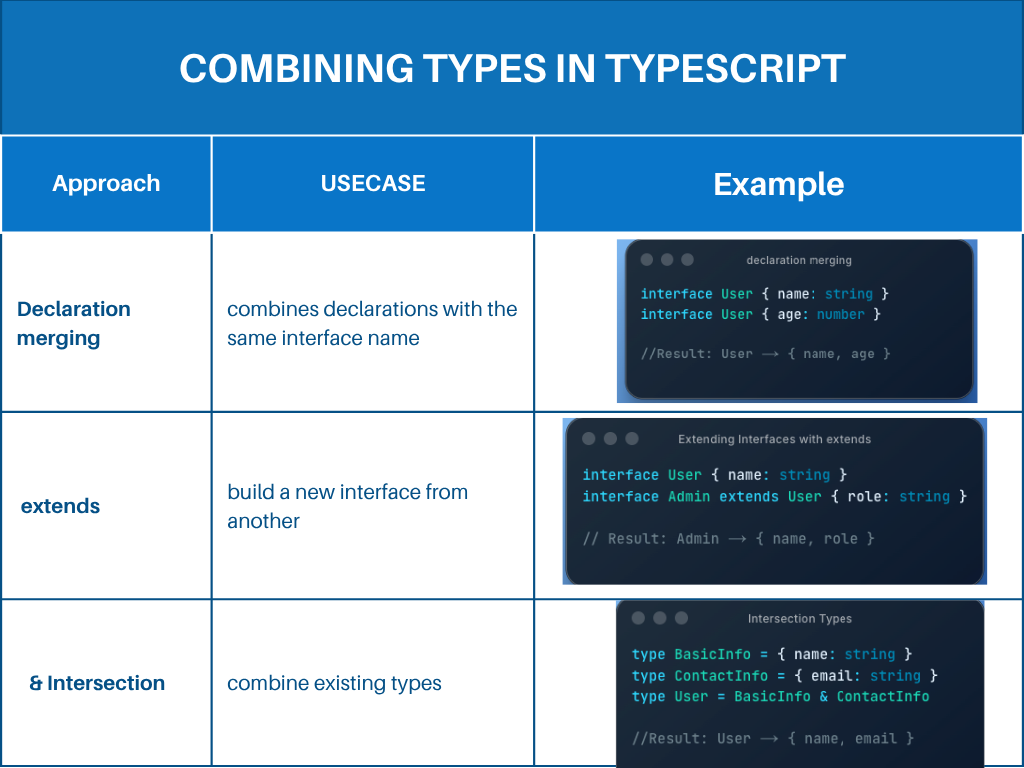
Combining Types in TypeScript
TypeScript provides several ways to combine types and build more reusable types.
The three common approaches are:
Declaration merging
Interface extension with
extendsIntersection types with
&
1. Declaration Merging
Declaration merging allows TypeScript to combine multiple interface declarations with the same name into one interface.
Example
interface User {
  id: number;
  name: string;
}

interface User {
  email: string;
}
TypeScript automatically combines them:
interface User {
  id: number;
  name: string;
  email: string;
}
So all three properties are required:
const user: User = {
  id: 1,
  name: "Thanos",
  email: "thanos@gmail.com",
};
Declaration merging is especially useful when working with third-party libraries, as it allows you to add properties or methods to existing interfaces without modifying their original source code.
2. Extending Interfaces with extends
The extends keyword allows one interface to inherit properties and methods from another interface.
Example
interface Hero {
  name: string;
  power: string;
}

interface Avenger extends Hero {
  team: string;
}
Avenger now includes all the properties from Hero plus its own team property.
const thor: Avenger = {
  name: "Thor",
  power: "Lightning",
  team: "Avengers",
};
Use extends when one type is a more specific version of another.
For example, Avenger is a type of Hero, so it can extend the Hero interface.
3. Intersection Types
The & operator creates an intersection type by combining multiple types into one.
Example
type Hero = {
  name: string;
};

type Avenger = {
  team: string;
};

type AvengerHero = Hero & Avenger;
AvengerHero must contain the properties from both Hero and Avenger:
const ironMan: AvengerHero = {
  name: "Iron Man",
  team: "Avengers",
};
Intersection types are useful when you want to combine different types into a single composite type.
When to Use Each Approach
Conclusion
And with that, we’ve reached the end of this TypeScript for Beginners guide. 🥂✨
I hope this guide was helpful and gave you a solid starting point for using it in your projects.
I’ll be sharing more advanced TypeScript topics in future articles, so keep an eye out for those.
Until next time,
Happy coding!